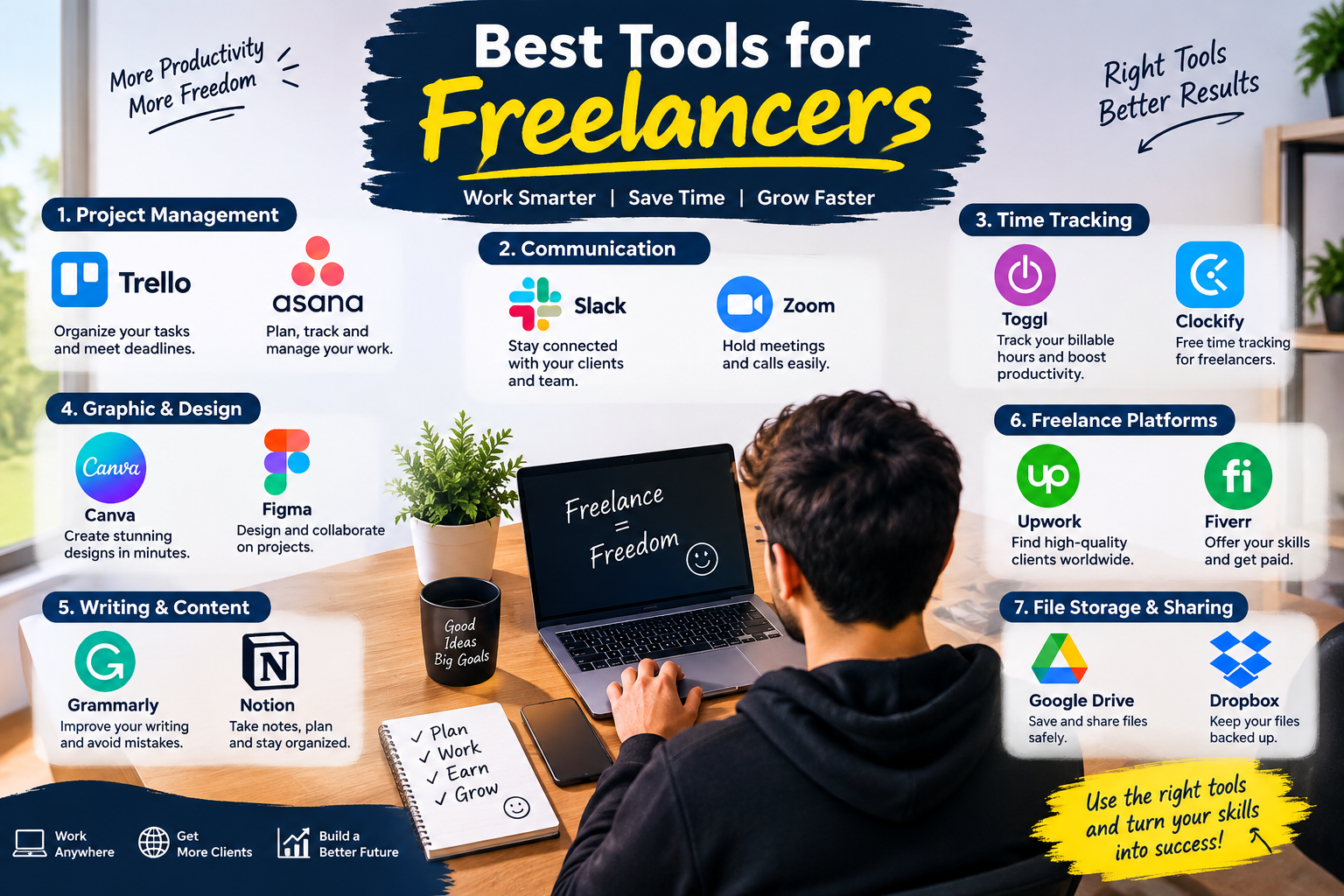
Freelancing gives you the freedom to choose your clients, working hours, and projects. However, managing everything yourself can become difficult. From communicating with clients and tracking time to creating designs, managing projects, and sending invoices, freelancers need the right tools to stay organized.
The good news is that there are many freelancing tools that can make your daily work easier and more productive.
In this guide, we’ll explore the best tools for freelancers in 2026, including project management, communication, time tracking, design, writing, file storage, and freelance platforms.
Why Do Freelancers Need the Right Tools?
A freelancer often has to perform several different roles. You may be a designer, writer, developer, marketer, project manager, and accountant at the same time.
The right tools can help you:
- Manage multiple projects
- Communicate professionally with clients
- Track working hours
- Organize tasks and deadlines
- Create professional designs
- Improve your writing
- Store and share files
- Manage invoices and payments
- Save time and improve productivity
Instead of using dozens of complicated applications, choose tools that match your specific freelance business.
1. Trello – Project Management
Trello is a simple project management tool that uses boards, lists, and cards to organize your work.
You can create a board for each client or project and move tasks through stages such as:
To Do → In Progress → Review → Completed
Best for:
- Freelance writers
- Web developers
- Designers
- Virtual assistants
- Small freelance teams
Trello is particularly useful if you prefer a visual way to manage your workload. To find out more about Trello, click here.
2. Asana – Manage Projects and Tasks
Asana is another popular project management tool for freelancers. It allows you to create tasks, set deadlines, organize projects, and monitor progress.
For example, a web developer could create tasks for:
- Client consultation
- Website design
- Development
- Testing
- Client review
- Final delivery
Asana can help freelancers keep projects organized and avoid missing deadlines. We have a complete tutorial of Asana here.
3. Slack – Client and Team Communication
Good communication is essential for freelance success.
Slack provides channels and direct messages that make it easier to communicate with clients and team members without relying entirely on email.
You can create separate channels for different projects and keep important conversations organized.
Slack is useful for:
- Client communication
- Team discussions
- Project updates
- Sharing files
- Quick questions
For larger freelance projects, organized communication can save a significant amount of time.
4. Zoom – Online Meetings
Sometimes written messages aren’t enough. Freelancers often need video meetings to discuss projects, interview clients, or present their work.
Zoom is a widely used video-conferencing tool that allows freelancers to communicate with clients remotely.
Before a client meeting, prepare a short agenda so you know exactly what needs to be discussed.
5. Toggl Track – Time Tracking
If you charge clients by the hour, time tracking software for freelancers can be extremely useful.
Toggl Track allows you to record how much time you spend on different projects and tasks.
For example:
- Client A — 2 hours
- Client B — 3.5 hours
- Website project — 4 hours
- Administrative work — 1 hour
Time tracking can also help you understand where your working hours are going and improve your estimates for future projects.
6. Clockify – Free Time Tracking
Clockify is another popular option for tracking freelance working hours.
You can use it to record time spent on individual projects and clients. This can be especially helpful for freelancers who are just starting and want a simple way to monitor their productivity.
Best for:
- Hourly freelancers
- Consultants
- Developers
- Virtual assistants
- Agencies
7. Canva – Graphic Design
You don’t have to be a professional graphic designer to create attractive visuals.
Canva provides templates and design tools for:
- Social media posts
- Presentations
- Blog graphics
- Resumes
- Business documents
- Thumbnails
- Marketing materials
For freelancers who regularly create visual content, Canva can significantly simplify the design process.
8. Figma – Professional Design and Collaboration
Figma is particularly useful for UI/UX designers and web designers.
It allows designers to create interfaces, prototypes, and design systems while collaborating with other people.
Freelancers can use Figma to share designs with clients and collect feedback before development begins.
Best for:
- UI/UX designers
- Web designers
- Product designers
- Design teams
9. Grammarly – Writing Assistant
Professional communication can make a strong impression on clients.
Grammarly can help identify spelling, grammar, punctuation, and writing issues.
Freelancers can use writing-assistance tools when creating:
- Client emails
- Proposals
- Blog posts
- Website copy
- Reports
- Freelance profiles
Remember that writing tools should support your own ideas rather than replace careful review.
10. Notion – Organize Your Freelance Business
Notion can work as a digital workspace for freelancers.
You can use it to organize:
- Client information
- Project notes
- Content calendars
- To-do lists
- Business goals
- Meeting notes
- Ideas
- Processes
One useful approach is to create a freelance dashboard containing all your important business information in one place.
11. Google Drive – File Storage and Sharing
Freelancers frequently need to share documents, images, videos, spreadsheets, and other files with clients.
Google Drive provides cloud storage and makes file sharing convenient.
You can create folders such as:
Clients → Client Name → Project → Final Files
This simple organization system can make it easier to find files when you need them.
12. Dropbox – Cloud File Management
Dropbox is another cloud storage option for freelancers.
It can be useful when you regularly work with large files or need to share folders with clients and collaborators.
Keeping important project files backed up can also reduce the risk of losing your work because of a computer problem.
13. Upwork – Find Freelance Jobs
Upwork is a major freelance marketplace where professionals can find projects and clients.
Freelancers can create profiles, showcase skills, submit proposals, and communicate with potential clients.
To improve your freelance profile:
- Clearly explain your skills
- Add relevant portfolio examples
- Write customized proposals
- Focus on the client’s problem
- Keep communication professional
Don’t simply send the same proposal to every client. A personalized proposal can better demonstrate that you understand the project.
14. Fiverr – Sell Freelance Services
Fiverr uses a service-based marketplace model where freelancers can create service listings, commonly known as gigs.
You can offer services such as:
- Logo design
- Content writing
- WordPress development
- Video editing
- SEO
- Social media management
- Virtual assistance
A clear service description and strong portfolio can help potential customers understand exactly what you offer.
15. AI Tools for Freelancers
Artificial intelligence has become increasingly useful for freelancers.
Depending on your profession, AI tools can help with:
- Brainstorming ideas
- Research assistance
- Drafting content
- Summarizing information
- Creating outlines
- Analyzing data
- Generating design concepts
- Automating repetitive tasks
However, freelancers should always review AI-generated work for accuracy, originality, quality, and client requirements.
The goal should be to work more efficiently, not simply produce more content.
How to Choose the Best Freelancing Tools
You don’t need every tool mentioned in this article.
Start by identifying your biggest challenges.
If you struggle with organization:
Try Trello, Asana, or Notion.
If you need better communication:
Consider Slack or Zoom.
If you need to track billable hours:
Try Toggl Track or Clockify.
If you create designs:
Consider Canva or Figma.
If you write regularly:
A writing assistant such as Grammarly can help with editing.
If you need cloud storage:
Google Drive or Dropbox can help.
If you need freelance clients:
Explore platforms such as Upwork and Fiverr.
Best Freelance Tool Stack for Beginners
If you’re just starting freelancing, keep your setup simple.
A beginner could use:
| Purpose | Tool |
|---|---|
| Project management | Trello |
| Communication | Slack / Zoom |
| Time tracking | Clockify |
| Design | Canva |
| Writing | Grammarly |
| Notes & organization | Notion |
| File storage | Google Drive |
| Finding clients | Upwork / Fiverr |
You can add more specialized software as your freelance business grows.
How Freelance Tools Can Increase Productivity
Having the right tools is only useful if you use them consistently.
Try creating a simple daily workflow:
Step 1: Check your task manager in the morning.
Step 2: Choose your most important tasks.
Step 3: Track your working time when necessary.
Step 4: Keep client communication organized.
Step 5: Save project files in clearly named folders.
Step 6: Review completed work before sending it to the client.
Step 7: Update your task list at the end of the day.
This system can help you stay organized without making your freelance workflow unnecessarily complicated.
Common Mistakes Freelancers Make With Tools
Using Too Many Tools
More tools don’t automatically mean more productivity. Switching between many applications can actually make your workflow harder to manage.
Ignoring File Organization
A messy folder structure can waste time. Create consistent folders for each client and project.
Not Tracking Time
Even if you don’t charge hourly, tracking your time occasionally can help you understand how long different types of work actually take.
Depending Completely on Automation
Automation can save time, but important client work should still be reviewed by a human.
Choosing Tools Without Considering Cost
Some tools have free plans while others require subscriptions. Check pricing, features, and limitations before building your entire workflow around a paid service.
Frequently Asked Questions
What are the best tools for freelancers?
Some commonly useful tools include Trello or Asana for project management, Slack and Zoom for communication, Clockify or Toggl Track for time tracking, Canva and Figma for design, Notion for organization, and Google Drive for file storage.
What is the best free tool for freelancers?
There isn’t one tool that is best for every freelancer. The right free tool depends on your work. Beginners can start with free versions of project management, communication, time-tracking, design, and cloud-storage tools and upgrade when their needs increase.
Do freelancers need project management software?
Not every freelancer needs specialized project management software. However, it can be very helpful when managing multiple clients, deadlines, tasks, or larger projects.
Which tools are useful for freelance writers?
Freelance writers can benefit from tools for writing assistance, project management, cloud storage, time tracking, research, and communication. A simple setup could include Notion, Google Drive, Clockify, and a writing assistant.
Which tools are useful for freelance designers?
Designers commonly use tools such as Figma and Canva, along with project management, communication, file-sharing, and time-tracking software.
Are freelance tools expensive?
Many freelance tools offer free plans or free trials. You can start with a small number of free tools and only pay for features that provide real value to your business.
Final Thoughts
The best tools for freelancers are the ones that solve real problems in your workflow. You don’t need to use every application available.
Start with a simple system for managing projects, communicating with clients, tracking time, storing files, and delivering your work. As your freelance career grows, you can add specialized tools for design, writing, automation, accounting, or other needs.
The right combination of freelancing tools can help you stay organized, save time, communicate professionally, and focus more of your energy on delivering valuable work to your clients.
Start small, build a reliable workflow, and add new tools only when you actually need them.
Leave a Reply