Blog

  • How to Prepare for a Jobs Interview: A Complete Guide for Beginners

    How to Prepare for a Jobs Interview: A Complete Guide for Beginners

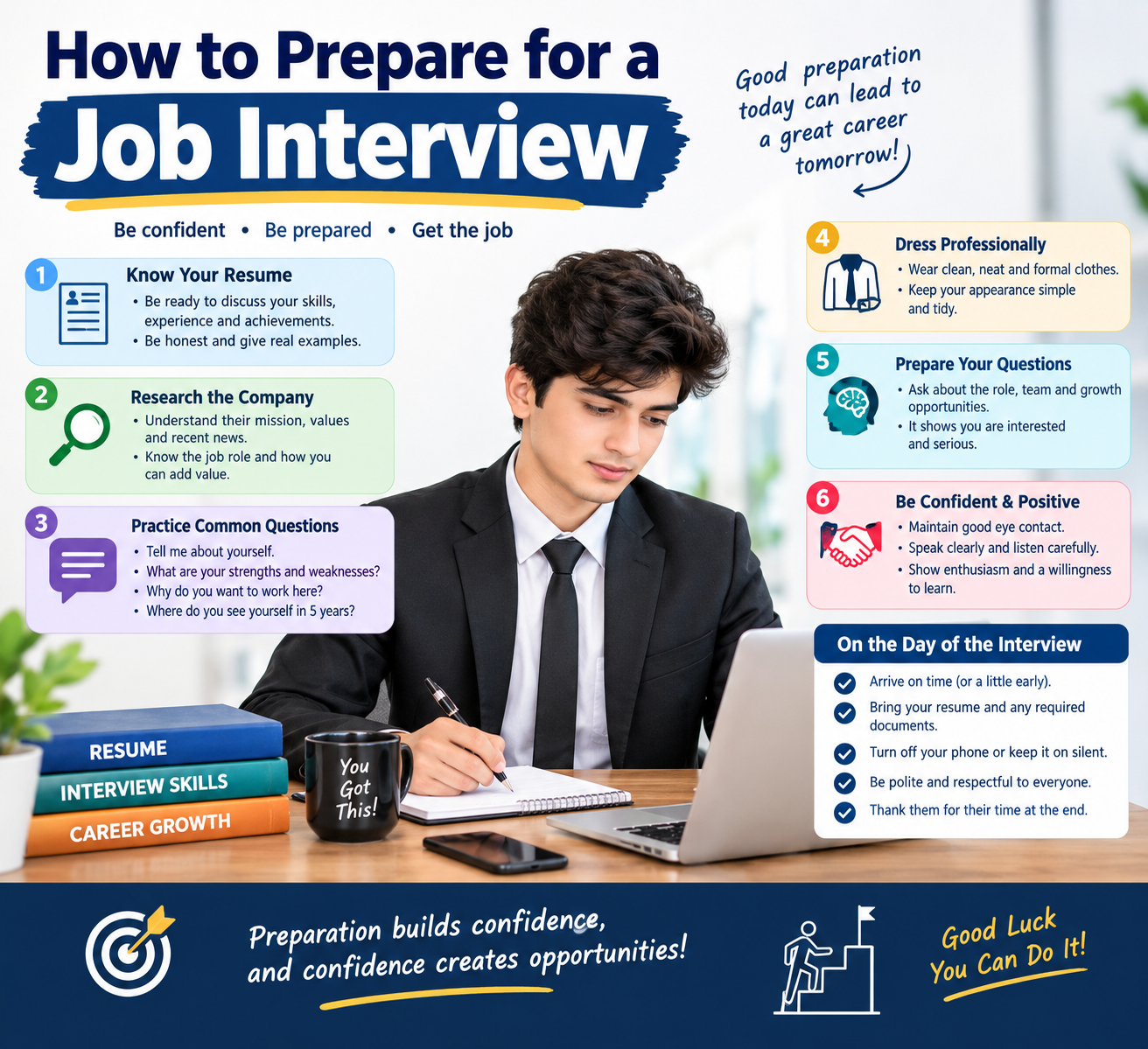
    A Jobs interview can feel stressful, especially if it is your first one. The good news is that you can become much more confident by preparing in advance.

    Whether you are applying for your first job, an internship, a remote position, or a new career opportunity, proper preparation can help you communicate your skills and experience clearly.

    In this complete guide, you will learn how to prepare for a job interview, what to research, what questions to practice, what to wear, and what to do after the interview.learn more

    What Is a Jobs Interview?

    A job interview is a conversation between a job candidate and an employer. The employer uses the interview to learn more about your skills, experience, communication, and suitability for the position.

    An interview also gives you an opportunity to learn more about the company and the job.

    Interviews can take several forms, including:

    • In-person interviews
    • Phone interviews
    • Video interviews
    • Group interviews
    • Technical interviews
    • Panel interviews
    • Online assessments followed by interviews

    Why Is Interview Preparationnfor Jobs is Important?

    Preparing for an interview can help you:

    • Understand the company
    • Learn more about the position
    • Organize your experience and skills
    • Answer common questions more confidently
    • Prepare questions for the interviewer
    • Reduce unnecessary stress
    • Make a professional first impression

    You do not need to memorize every possible answer. Instead, prepare your main points and practice explaining them naturally.

    1. Read the Jobs Description Carefully

    The first step is to understand exactly what the employer is looking for.

    Read the job description and highlight:

    • Required skills
    • Preferred skills
    • Education requirements
    • Work experience
    • Job responsibilities
    • Technical requirements
    • Soft skills
    • Certifications

    For example, if a job description says the company needs someone with communication, teamwork, and Microsoft Excel skills, prepare examples that demonstrate these abilities.

    Match Your Skills With the Job

    Create a simple list:

    Job RequirementYour Evidence
    CommunicationSchool or project presentations
    TeamworkGroup projects
    ExcelCoursework or personal projects
    Problem-solvingProject experience
    Time managementManaging multiple assignments

    This makes it easier to explain why your background is relevant.

    2. Research the Company

    Before your Jobs interview, spend some time learning about the company.

    Visit its official website and look for information about:

    • Products or services
    • Company history
    • Mission and values
    • Recent projects
    • Company culture
    • Industry
    • Main customers
    • Jobs responsibilities

    You should be able to answer a basic question such as:

    “What do you know about our company?”

    A good answer should show that you actually researched the organization rather than simply saying, “I know it is a good company.”

    3. Research the Position of Jobs

    Understanding the company is important, but understanding the specific position is equally important.

    Ask yourself:

    • What would I do every day?
    • What skills are most important?
    • What problems might I need to solve?
    • Which of my skills match this position?
    • What can I contribute to the team?

    Think about specific examples from your education, projects, volunteering, internships, freelance work, or previous jobs.

    4. Prepare Your Introduction for Jobs

    Many interviews begin with:

    “Tell me about yourself.”

    This does not mean you need to tell your entire life story.

    A simple structure is:

    Present → Past → Future

    Present

    Explain what you are currently doing.

    Past

    Briefly mention relevant education, experience, or projects.

    Future

    Explain why you are interested in the position.

    For example:

    “I recently completed my studies in computer science and have been developing my skills in web development through personal projects. I have particularly enjoyed working with websites and solving technical problems. I am now looking for an opportunity where I can continue developing my skills while contributing to a professional team.”

    Keep your introduction relevant to the job.

    5. Practice Common Interview Questions for Jobs

    One of the best ways to prepare is to practice common questions.

    Common Interview Questions for Beginners

    1. Tell me about yourself.

    Focus on your education, skills, experience, and career interests.

    2. Why do you want this job?

    Explain what interests you about the position and how it connects with your goals.

    3. Why do you want to work for our company?

    Mention something specific you learned during your company research.

    4. What are your strengths?

    Choose strengths that are relevant to the position.

    Examples include:

    • Communication
    • Organization
    • Problem-solving
    • Teamwork
    • Creativity
    • Adaptability
    • Time management

    Give an example whenever possible.

    5. What is your biggest weakness?

    Choose a genuine but manageable area for improvement and explain what you are doing to improve it.

    6. Why should we hire you?

    Connect your skills and experience to the requirements of the position.

    7. Where do you see yourself in five years?

    Talk about realistic professional development and the skills you want to build.

    8. Tell me about a challenge you faced.

    Explain the situation, what you did, and what you learned.

    6. Use the STAR Method

    The STAR method is a useful way to answer behavioral interview questions.

    STAR means:

    • S — Situation: What was happening?
    • T — Task: What needed to be done?
    • A — Action: What did you do?
    • R — Result: What happened afterward?

    Example

    Question: “Tell me about a time you worked as part of a team.”

    Situation: I worked on a group project at school.

    Task: Our team needed to complete the project within a short deadline.

    Action: I helped divide the work among team members and completed my assigned section early.

    Result: We completed the project on time and received positive feedback.

    This structure helps keep your answers organized.

    7. Prepare Your Own Questions

    An interview is not only about answering questions. You should also have questions ready for the interviewer.

    Good questions include:

    • What does a typical day in this position look like?
    • What would success look like in the first few months?
    • What skills are most important for this role?
    • How does the team usually work together?
    • What opportunities are available for learning and development?
    • What are the next steps in the hiring process?

    Avoid asking questions that could easily be answered by reading the company’s website.

    8. Prepare Your Resume

    Before the interview, carefully review your resume.

    Make sure you can explain everything listed on it.

    Be prepared to discuss:

    • Education
    • Previous jobs
    • Internships
    • Projects
    • Skills
    • Certifications
    • Achievements
    • Volunteer experience

    Never add skills or experience that you cannot honestly explain.

    If you are a beginner with little work experience, highlight:

    • School or university projects
    • Freelance work
    • Personal projects
    • Internships
    • Volunteer work
    • Relevant courses
    • Transferable skills

    9. Choose Professional Interview Clothing

    Your clothing should be clean, neat, comfortable, and appropriate for the workplace.

    For a traditional professional interview, consider:

    • A clean shirt
    • Formal or smart trousers
    • Clean shoes
    • Minimal accessories
    • Neat hair
    • Simple, professional clothing

    For a creative or casual workplace, the dress code may be less formal.

    If you are unsure, researching the company’s workplace culture can help you decide.

    10. Prepare for an Online Interview

    Many companies conduct interviews through video calls.

    Before the interview:

    • Test your microphone
    • Test your camera
    • Check your internet connection
    • Charge your laptop
    • Choose a quiet location
    • Clean up your background
    • Keep your resume nearby
    • Close unnecessary applications
    • Test the meeting link

    Try to join a few minutes early.

    Look at the camera when speaking and avoid constantly checking yourself on the screen.

    11. Plan Your Journey for an In-Person Interview

    If the interview is in person, plan your route beforehand.

    Check:

    • Address
    • Travel time
    • Transportation
    • Parking
    • Building entrance
    • Interview time

    Try to arrive a little early rather than rushing in at the last minute.

    12. Practice Your Body Language

    Communication is more than words.

    During an interview:

    • Sit comfortably
    • Maintain natural eye contact
    • Listen carefully
    • Avoid constantly checking your phone
    • Smile when appropriate
    • Speak clearly
    • Avoid interrupting
    • Keep your posture professional

    You do not need to appear perfect. The goal is to communicate naturally and confidently.

    13. Practice Without Memorizing

    Practice your answers, but do not memorize them word-for-word.

    If you memorize everything, your answers can sound robotic.

    Instead, remember the main points you want to communicate.

    You can practice by:

    • Speaking in front of a mirror
    • Recording yourself
    • Practicing with a friend
    • Using mock interview questions
    • Practicing video interviews

    14. Prepare Your Documents

    Depending on the job, you may want to bring:

    • Copies of your resume
    • Portfolio
    • Certificates
    • References
    • Notebook
    • Pen
    • Relevant project samples

    For online interviews, keep digital copies of important documents easily accessible.

    15. Prepare the Night Before

    Do not wait until the morning of your interview to prepare everything.

    The night before:

    • Review the job description
    • Research the company
    • Review your resume
    • Practice key questions
    • Prepare your clothes
    • Organize your documents
    • Confirm the interview location or link
    • Set an alarm
    • Get enough rest

    Being organized can make the interview day much easier.

    16. What to Do During the Interview

    When the interview begins, greet the interviewer politely.

    Listen carefully to each question before answering.

    If you do not understand a question, it is okay to ask:

    “Could you please clarify the question?”

    If you need a moment to think, take a short pause before answering.

    Try to keep your answers:

    • Clear
    • Relevant
    • Honest
    • Concise
    • Supported by examples

    17. How to Handle Questions You Cannot Answer

    You will not necessarily know the answer to every question.

    If you do not know something, avoid pretending that you do.

    Instead, you can explain:

    “I haven’t worked with that yet, but I am interested in learning it.”

    This shows honesty and a willingness to learn.

    18. Mistakes to Avoid in a Job Interview

    Avoid these common mistakes:

    Being Late

    Plan your journey or test your online setup in advance.

    Not Researching the Company

    Basic company knowledge shows preparation.

    Giving Extremely Long Answers

    Stay focused on the question.

    Speaking Negatively About Previous Employers

    Keep your comments professional.

    Checking Your Phone

    Keep your phone silent and away during the interview.

    Lying About Your Skills

    Be honest about what you know and what you are still learning.

    Having No Questions

    Prepare a few questions before the interview.

    Forgetting the Job Description

    Know the main responsibilities of the position.

    19. What to Do After the Interview

    Your preparation should not stop when the interview ends.

    Take a few minutes to write down:

    • Questions you were asked
    • Questions you answered well
    • Questions that were difficult
    • Things you want to improve
    • Important information about the position

    This can help you perform better in future interviews.

    If appropriate, you can also send a short professional thank-you message.

    20. Beginner Interview Checklist

    Use this checklist before your next interview:

    • Read the job description
    • Research the company
    • Research the position
    • Review your resume
    • Prepare your introduction
    • Practice common questions
    • Prepare STAR examples
    • Prepare questions for the interviewer
    • Choose appropriate clothing
    • Prepare documents
    • Test your camera and microphone
    • Check your internet connection
    • Plan your travel
    • Set an alarm
    • Arrive early
    • Put your phone away
    • Stay calm and listen carefully

    Frequently Asked Questions

    How early should I arrive for a job interview?

    For an in-person interview, arriving around 10–15 minutes early is generally a practical target. For an online interview, joining a few minutes before the scheduled time allows you to handle technical issues.

    What should I say when an interviewer asks, “Tell me about yourself”?

    Give a short professional introduction covering your current situation, relevant background, important skills, and why you are interested in the position.

    What should I wear to a job interview?

    Choose clean, neat clothing that fits the company’s professional environment. When uncertain, slightly more formal clothing is usually a reasonable choice.

    What if I have no work experience?

    Focus on relevant education, projects, internships, freelance work, volunteer activities, courses, and transferable skills.

    How can I become more confident in interviews?

    Practice answering common questions, learn about the company, prepare examples from your experience, and become familiar with the job description.

    Should I ask questions at the end of an interview?

    Yes. Preparing a few thoughtful questions can help you understand the role and demonstrate that you have prepared for the conversation.

    Final Thoughts

    Preparing for a job interview does not have to be complicated. Start by understanding the job, researching the company, reviewing your resume, and practicing common questions.

    Remember that an interview is a professional conversation. You do not need to have a perfect answer to every question. Be honest, listen carefully, communicate clearly, and use real examples to demonstrate your skills.

    The more you practice, the more familiar the interview process will become.

    Good preparation can turn an interview from a stressful experience into an opportunity to demonstrate what you can do.


    Quick Interview Formula

    Research → Prepare → Practice → Dress Professionally → Arrive Early → Communicate Clearly → Ask Questions → Follow Up

    SEO Information

    SEO Title: How to Prepare for a Job Interview: Complete Beginner’s Guide

    Meta Description: Learn how to prepare for a job interview with this complete beginner’s guide. Discover interview questions, preparation tips, STAR method, resume advice, and more.

    Focus Keyword: How to Prepare for a Job Interview

    Secondary Keywords:

    • job interview preparation
    • interview tips for beginners
    • how to prepare for an interview
    • common interview questions
    • job interview tips
    • interview preparation checklist
    • first job interview tips

    Suggested URL Slug:
    /how-to-prepare-for-a-job-interview/
  • Best Tools for Freelancers in 2026

    Best Tools for Freelancers in 2026

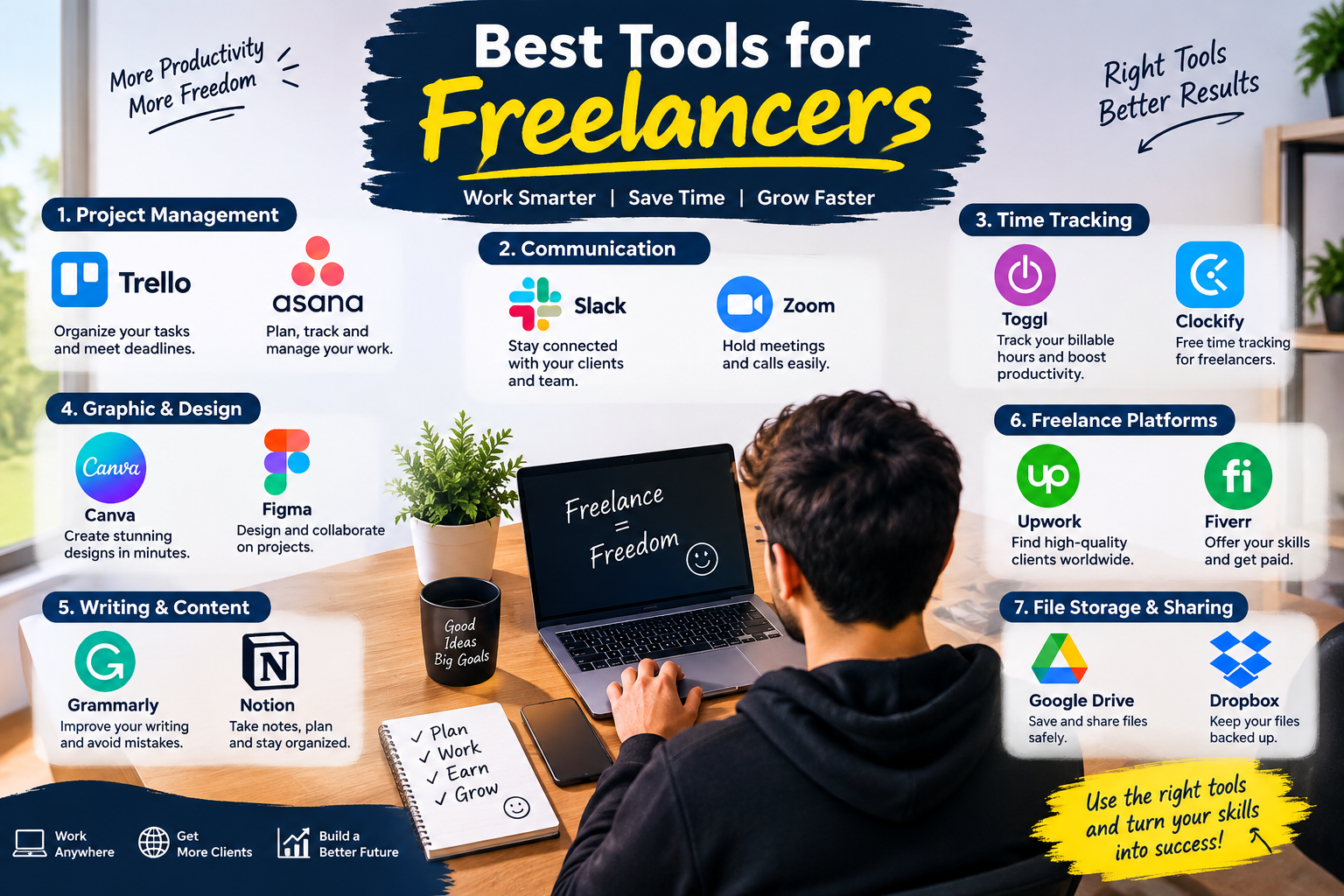
    Freelancing gives you the freedom to choose your clients, working hours, and projects. However, managing everything yourself can become difficult. From communicating with clients and tracking time to creating designs, managing projects, and sending invoices, freelancers need the right tools to stay organized.

    The good news is that there are many freelancing tools that can make your daily work easier and more productive.

    In this guide, we’ll explore the best tools for freelancers in 2026, including project management, communication, time tracking, design, writing, file storage, and freelance platforms.

    Why Do Freelancers Need the Right Tools?

    A freelancer often has to perform several different roles. You may be a designer, writer, developer, marketer, project manager, and accountant at the same time.

    The right tools can help you:

    • Manage multiple projects
    • Communicate professionally with clients
    • Track working hours
    • Organize tasks and deadlines
    • Create professional designs
    • Improve your writing
    • Store and share files
    • Manage invoices and payments
    • Save time and improve productivity

    Instead of using dozens of complicated applications, choose tools that match your specific freelance business.

    1. Trello – Project Management

    Trello is a simple project management tool that uses boards, lists, and cards to organize your work.

    You can create a board for each client or project and move tasks through stages such as:

    To Do → In Progress → Review → Completed

    Best for:

    • Freelance writers
    • Web developers
    • Designers
    • Virtual assistants
    • Small freelance teams

    Trello is particularly useful if you prefer a visual way to manage your workload. To find out more about Trello, click here.

    2. Asana – Manage Projects and Tasks

    Asana is another popular project management tool for freelancers. It allows you to create tasks, set deadlines, organize projects, and monitor progress.

    For example, a web developer could create tasks for:

    1. Client consultation
    2. Website design
    3. Development
    4. Testing
    5. Client review
    6. Final delivery

    Asana can help freelancers keep projects organized and avoid missing deadlines. We have a complete tutorial of Asana here.

    3. Slack – Client and Team Communication

    Good communication is essential for freelance success.

    Slack provides channels and direct messages that make it easier to communicate with clients and team members without relying entirely on email.

    You can create separate channels for different projects and keep important conversations organized.

    Slack is useful for:

    • Client communication
    • Team discussions
    • Project updates
    • Sharing files
    • Quick questions

    For larger freelance projects, organized communication can save a significant amount of time.

    4. Zoom – Online Meetings

    Sometimes written messages aren’t enough. Freelancers often need video meetings to discuss projects, interview clients, or present their work.

    Zoom is a widely used video-conferencing tool that allows freelancers to communicate with clients remotely.

    Before a client meeting, prepare a short agenda so you know exactly what needs to be discussed.

    5. Toggl Track – Time Tracking

    If you charge clients by the hour, time tracking software for freelancers can be extremely useful.

    Toggl Track allows you to record how much time you spend on different projects and tasks.

    For example:

    • Client A — 2 hours
    • Client B — 3.5 hours
    • Website project — 4 hours
    • Administrative work — 1 hour

    Time tracking can also help you understand where your working hours are going and improve your estimates for future projects.

    6. Clockify – Free Time Tracking

    Clockify is another popular option for tracking freelance working hours.

    You can use it to record time spent on individual projects and clients. This can be especially helpful for freelancers who are just starting and want a simple way to monitor their productivity.

    Best for:

    • Hourly freelancers
    • Consultants
    • Developers
    • Virtual assistants
    • Agencies

    7. Canva – Graphic Design

    You don’t have to be a professional graphic designer to create attractive visuals.

    Canva provides templates and design tools for:

    • Social media posts
    • Presentations
    • Blog graphics
    • Resumes
    • Business documents
    • Thumbnails
    • Marketing materials

    For freelancers who regularly create visual content, Canva can significantly simplify the design process.

    8. Figma – Professional Design and Collaboration

    Figma is particularly useful for UI/UX designers and web designers.

    It allows designers to create interfaces, prototypes, and design systems while collaborating with other people.

    Freelancers can use Figma to share designs with clients and collect feedback before development begins.

    Best for:

    • UI/UX designers
    • Web designers
    • Product designers
    • Design teams

    9. Grammarly – Writing Assistant

    Professional communication can make a strong impression on clients.

    Grammarly can help identify spelling, grammar, punctuation, and writing issues.

    Freelancers can use writing-assistance tools when creating:

    • Client emails
    • Proposals
    • Blog posts
    • Website copy
    • Reports
    • Freelance profiles

    Remember that writing tools should support your own ideas rather than replace careful review.

    10. Notion – Organize Your Freelance Business

    Notion can work as a digital workspace for freelancers.

    You can use it to organize:

    • Client information
    • Project notes
    • Content calendars
    • To-do lists
    • Business goals
    • Meeting notes
    • Ideas
    • Processes

    One useful approach is to create a freelance dashboard containing all your important business information in one place.

    11. Google Drive – File Storage and Sharing

    Freelancers frequently need to share documents, images, videos, spreadsheets, and other files with clients.

    Google Drive provides cloud storage and makes file sharing convenient.

    You can create folders such as:

    Clients → Client Name → Project → Final Files

    This simple organization system can make it easier to find files when you need them.

    12. Dropbox – Cloud File Management

    Dropbox is another cloud storage option for freelancers.

    It can be useful when you regularly work with large files or need to share folders with clients and collaborators.

    Keeping important project files backed up can also reduce the risk of losing your work because of a computer problem.

    13. Upwork – Find Freelance Jobs

    Upwork is a major freelance marketplace where professionals can find projects and clients.

    Freelancers can create profiles, showcase skills, submit proposals, and communicate with potential clients.

    To improve your freelance profile:

    • Clearly explain your skills
    • Add relevant portfolio examples
    • Write customized proposals
    • Focus on the client’s problem
    • Keep communication professional

    Don’t simply send the same proposal to every client. A personalized proposal can better demonstrate that you understand the project.

    14. Fiverr – Sell Freelance Services

    Fiverr uses a service-based marketplace model where freelancers can create service listings, commonly known as gigs.

    You can offer services such as:

    • Logo design
    • Content writing
    • WordPress development
    • Video editing
    • SEO
    • Social media management
    • Virtual assistance

    A clear service description and strong portfolio can help potential customers understand exactly what you offer.

    15. AI Tools for Freelancers

    Artificial intelligence has become increasingly useful for freelancers.

    Depending on your profession, AI tools can help with:

    • Brainstorming ideas
    • Research assistance
    • Drafting content
    • Summarizing information
    • Creating outlines
    • Analyzing data
    • Generating design concepts
    • Automating repetitive tasks

    However, freelancers should always review AI-generated work for accuracy, originality, quality, and client requirements.

    The goal should be to work more efficiently, not simply produce more content.

    How to Choose the Best Freelancing Tools

    You don’t need every tool mentioned in this article.

    Start by identifying your biggest challenges.

    If you struggle with organization:

    Try Trello, Asana, or Notion.

    If you need better communication:

    Consider Slack or Zoom.

    If you need to track billable hours:

    Try Toggl Track or Clockify.

    If you create designs:

    Consider Canva or Figma.

    If you write regularly:

    A writing assistant such as Grammarly can help with editing.

    If you need cloud storage:

    Google Drive or Dropbox can help.

    If you need freelance clients:

    Explore platforms such as Upwork and Fiverr.

    Best Freelance Tool Stack for Beginners

    If you’re just starting freelancing, keep your setup simple.

    A beginner could use:

    PurposeTool
    Project managementTrello
    CommunicationSlack / Zoom
    Time trackingClockify
    DesignCanva
    WritingGrammarly
    Notes & organizationNotion
    File storageGoogle Drive
    Finding clientsUpwork / Fiverr

    You can add more specialized software as your freelance business grows.

    How Freelance Tools Can Increase Productivity

    Having the right tools is only useful if you use them consistently.

    Try creating a simple daily workflow:

    Step 1: Check your task manager in the morning.

    Step 2: Choose your most important tasks.

    Step 3: Track your working time when necessary.

    Step 4: Keep client communication organized.

    Step 5: Save project files in clearly named folders.

    Step 6: Review completed work before sending it to the client.

    Step 7: Update your task list at the end of the day.

    This system can help you stay organized without making your freelance workflow unnecessarily complicated.

    Common Mistakes Freelancers Make With Tools

    Using Too Many Tools

    More tools don’t automatically mean more productivity. Switching between many applications can actually make your workflow harder to manage.

    Ignoring File Organization

    A messy folder structure can waste time. Create consistent folders for each client and project.

    Not Tracking Time

    Even if you don’t charge hourly, tracking your time occasionally can help you understand how long different types of work actually take.

    Depending Completely on Automation

    Automation can save time, but important client work should still be reviewed by a human.

    Choosing Tools Without Considering Cost

    Some tools have free plans while others require subscriptions. Check pricing, features, and limitations before building your entire workflow around a paid service.

    Frequently Asked Questions

    What are the best tools for freelancers?

    Some commonly useful tools include Trello or Asana for project management, Slack and Zoom for communication, Clockify or Toggl Track for time tracking, Canva and Figma for design, Notion for organization, and Google Drive for file storage.

    What is the best free tool for freelancers?

    There isn’t one tool that is best for every freelancer. The right free tool depends on your work. Beginners can start with free versions of project management, communication, time-tracking, design, and cloud-storage tools and upgrade when their needs increase.

    Do freelancers need project management software?

    Not every freelancer needs specialized project management software. However, it can be very helpful when managing multiple clients, deadlines, tasks, or larger projects.

    Which tools are useful for freelance writers?

    Freelance writers can benefit from tools for writing assistance, project management, cloud storage, time tracking, research, and communication. A simple setup could include Notion, Google Drive, Clockify, and a writing assistant.

    Which tools are useful for freelance designers?

    Designers commonly use tools such as Figma and Canva, along with project management, communication, file-sharing, and time-tracking software.

    Are freelance tools expensive?

    Many freelance tools offer free plans or free trials. You can start with a small number of free tools and only pay for features that provide real value to your business.

    Final Thoughts

    The best tools for freelancers are the ones that solve real problems in your workflow. You don’t need to use every application available.

    Start with a simple system for managing projects, communicating with clients, tracking time, storing files, and delivering your work. As your freelance career grows, you can add specialized tools for design, writing, automation, accounting, or other needs.

    The right combination of freelancing tools can help you stay organized, save time, communicate professionally, and focus more of your energy on delivering valuable work to your clients.

    Start small, build a reliable workflow, and add new tools only when you actually need them.

  • How to Search for Jobs Online: A Beginner’s Guide

    How to Search for Jobs Online: A Beginner’s Guide

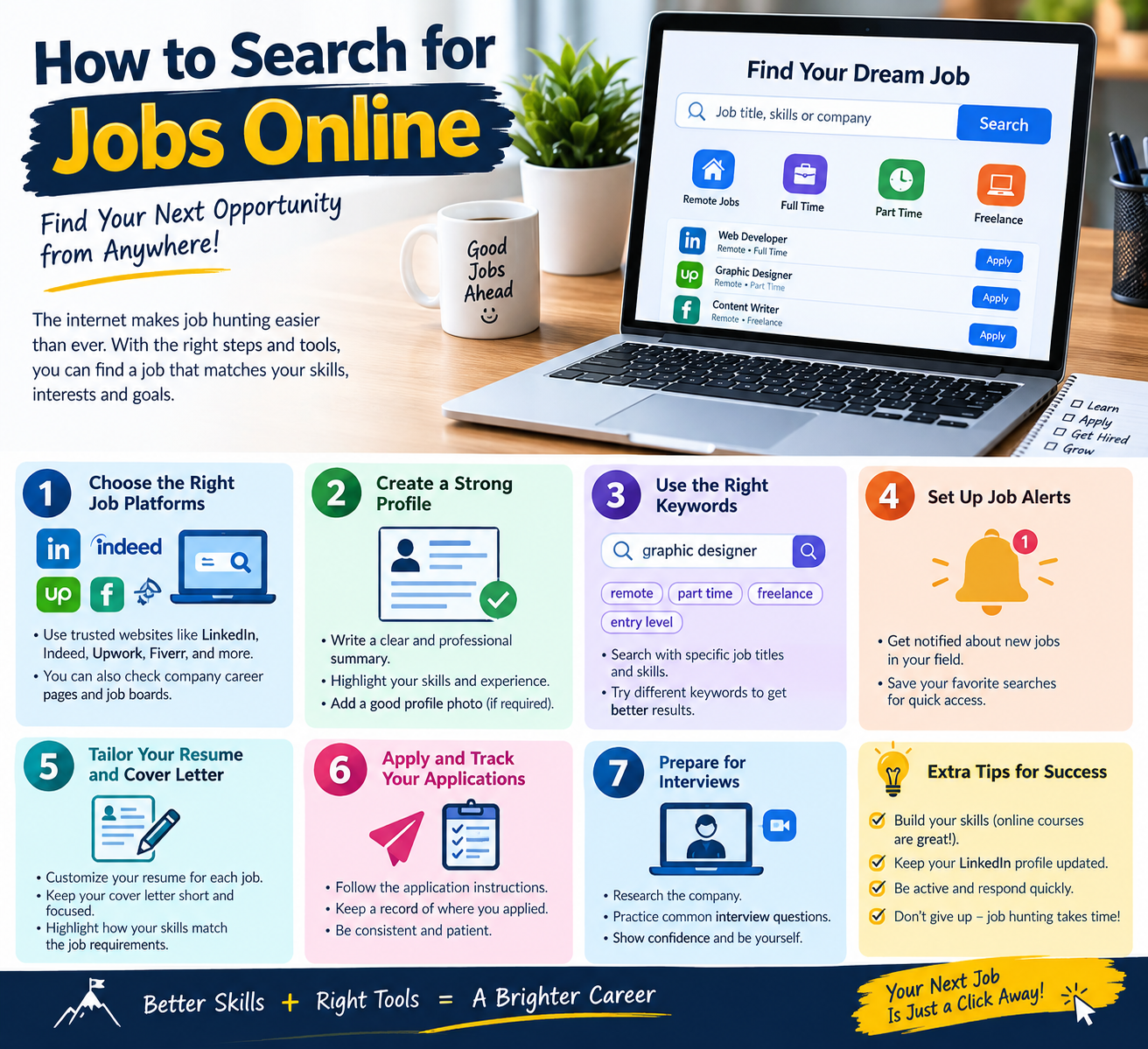
    Finding a Jobs online has become one of the easiest ways to discover new career opportunities. Whether you are looking for your first job, a remote position, a part-time role, or a better career opportunity, online job searching can help you reach employers from almost anywhere.

    However, simply searching for jobs is not enough. You need to know where to search, how to create a strong profile, and how to apply effectively.learn more

    1. Decide What Type of Jobs You Want

    Before you start searching, identify the type of work you are interested in.

    Consider:

    • Your skills and experience
    • Your education
    • Your preferred industry
    • Full-time or part-time work
    • Remote or office-based jobs
    • Your expected salary
    • Your preferred location

    Having a clear goal makes your job search more focused.

    2. Create a Professional Resume Jobs

    A good resume is one of the most important parts of an online job search.

    Your resume should include:

    • Full name and contact information
    • Career objective or professional summary
    • Education
    • Work experience
    • Relevant skills
    • Certifications
    • Projects or achievements

    Keep your resume clear, simple, and easy to read. Try to customize it for the type of job you are applying for.

    3. Use Online Jobs Websites

    There are many websites where employers publish job openings. Search using specific keywords related to your desired position.

    For example, instead of searching only for “jobs,” try:

    • “Junior Web Developer”
    • “Graphic Designer”
    • “Digital Marketing Assistant”
    • “Remote Customer Support”
    • “Entry-Level Accountant”

    Specific searches usually make it easier to find relevant opportunities.

    4. Build a Professional Online Profile

    Many employers check candidates’ online professional profiles before contacting them.

    Make sure your professional profile contains:

    • A clear profile photo
    • A professional headline
    • Your skills
    • Education and experience
    • Projects
    • Certifications
    • A short professional summary

    Keep your information accurate and up to date.

    5. Set Up Job Alerts

    Many job websites allow you to create job alerts.

    You can choose:

    • Job title
    • Location
    • Remote work
    • Experience level
    • Industry

    When a matching job is posted, you can receive a notification instead of searching manually every day.

    6. Read the Job Description Carefully

    Before applying, read the complete job description.

    Look for:

    • Required skills
    • Education requirements
    • Experience requirements
    • Job responsibilities
    • Location
    • Working hours
    • Application instructions

    Only apply when the position reasonably matches your qualifications.

    7. Customize Your Application

    Avoid sending exactly the same application to every employer.

    Adjust your resume and cover letter to highlight the skills that are relevant to the specific position.

    For example, if a job requires WordPress skills, highlight your WordPress projects and experience.

    8. Keep Track of Your Applications

    Create a simple spreadsheet or document to track your applications.

    You can record:

    JobCompanyDate AppliedStatus
    Web DeveloperCompany ASept. 10Applied
    Graphic DesignerCompany BSept.
  • Best Skills to Put on a Resume in 2026

    Best Skills to Put on a Resume in 2026

    Your resume is often the first thing an employer sees, so choosing the right skills can make a big difference. A strong resume should show both your technical abilities and your personal strengths that match the job you want.

    In this guide, we’ll look at the best skills to put on a resume and how to present them effectively.

    Why Are Skills Important on a Resume?

    Employers often scan resumes quickly to find skills that match their job requirements. Including relevant skills can help your resume stand out and may also help it pass through an Applicant Tracking System (ATS).

    However, adding too many unrelated skills can make your resume less effective. Focus on skills that are relevant to the position.

    1. Communication Skills

    Communication is valuable in almost every career. Employers look for people who can communicate information clearly and professionally.

    Examples include:

    • Written communication
    • Verbal communication
    • Active listening
    • Presentation skills
    • Professional email writing
    • Customer communication

    2. Computer Skills

    Basic computer skills are useful for many modern jobs.

    Examples include:

    • Microsoft Word
    • Microsoft Excel
    • Microsoft PowerPoint
    • Google Workspace
    • Email management
    • Online collaboration tools

    For technology-related positions, you can list more specialized skills such as programming, databases, or software development.

    3. Digital Marketing

    Digital marketing skills are useful for marketing, business, freelancing, and online careers.

    Examples include:

    • Search engine optimization (SEO)
    • Social media marketing
    • Content marketing
    • Email marketing
    • Google Analytics
    • Keyword research

    4. Problem-Solving

    Employers value people who can identify problems and find practical solutions.

    You can demonstrate problem-solving through examples of projects where you:

    • Identified an issue
    • Analyzed possible solutions
    • Made a decision
    • Improved a process
    • Achieved a measurable result

    5. Time Management

    Good time management helps employees complete tasks and meet deadlines.

    Useful skills include:

    • Task prioritization
    • Meeting deadlines
    • Planning
    • Organization
    • Managing multiple tasks

    6. Teamwork

    Most workplaces require employees to work with other people. Teamwork skills show that you can cooperate and contribute to shared goals.

    Examples include:

    • Collaboration
    • Conflict resolution
    • Sharing responsibilities
    • Supporting team members
    • Giving and receiving feedback

    7. Leadership

    Leadership isn’t only for managers. It can also include taking responsibility, organizing projects, and helping others achieve goals.

    Examples include:

    • Team coordination
    • Decision-making
    • Delegation
    • Project management
    • Mentoring

    8. Adaptability

    Workplaces and technologies change quickly. Adaptability shows that you can learn and adjust when circumstances change.

    You can demonstrate adaptability by mentioning:

    • Learning new software
    • Taking on new responsibilities
    • Learning new skills
    • Working in changing environments

    9. Project Management

    Project management skills can be valuable for many professional roles.

    Examples include:

    • Planning projects
    • Setting deadlines
    • Managing resources
    • Tracking progress
    • Coordinating teams
    • Risk management

    10. Customer Service

    Customer service skills are particularly useful for retail, sales, support, hospitality, and many freelance roles.

    Examples include:

    • Customer communication
    • Complaint handling
    • Problem resolution
    • Product knowledge
    • Relationship building

    11. Writing Skills

    Strong writing can be valuable in many careers.

    Depending on the position, you might include:

    • Content writing
    • Copywriting
    • Technical writing
    • Report writing
    • Editing
    • Proofreading

    12. AI Skills

    AI-related skills are becoming increasingly useful across many industries. Instead of simply writing “AI” on your resume, mention the specific tools or abilities you actually have.

    Examples include:

    • AI-assisted research
    • AI content workflows
    • Prompt writing
    • AI productivity tools
    • Data analysis with AI tools
    • AI-assisted coding

    Only list AI tools or skills you genuinely understand and can discuss in an interview.

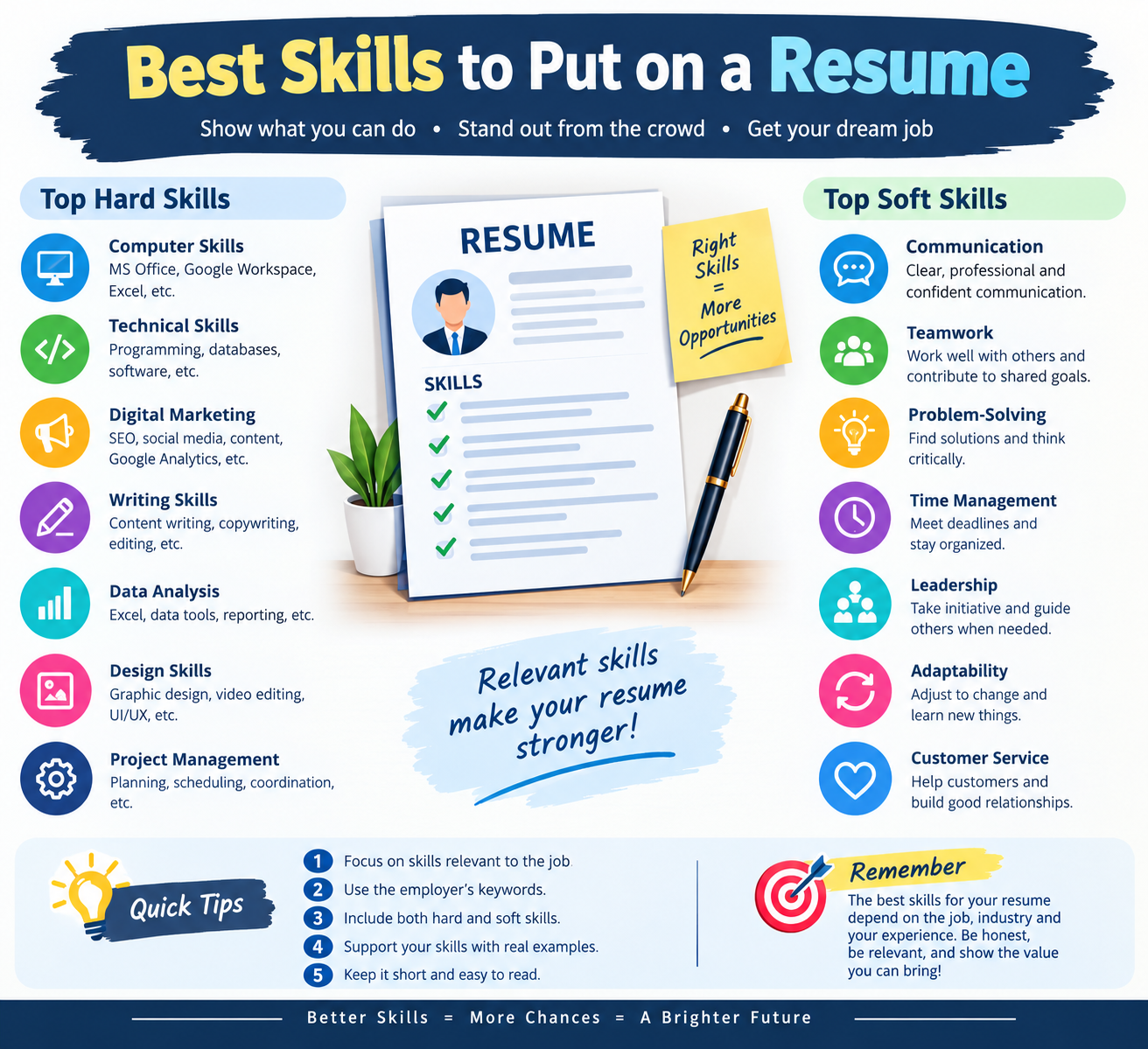
    Hard Skills vs. Soft Skills

    A strong resume can include both hard skills and soft skills.

    Hard skills are specific abilities that can often be learned and demonstrated, such as:

    • Excel
    • SEO
    • Graphic design
    • Programming
    • Data analysis
    • Video editing

    Soft skills relate to how you work with people and manage tasks, such as:

    • Communication
    • Teamwork
    • Adaptability
    • Leadership
    • Time management
    • Problem-solving

    The best combination depends on the job.

    How to Choose the Right Skills

    Don’t use the same skills section for every application. Read the job description carefully and identify the abilities the employer is asking for.

    Then:

    1. Identify the most important requirements.
    2. Match them with skills you genuinely have.
    3. Use the employer’s terminology when it accurately describes your experience.
    4. Put your most relevant skills near the top.
    5. Support important skills with examples in your experience section.

    For example, instead of simply writing:

    “Communication skills”

    you could demonstrate it through an experience bullet such as:

    “Communicated with clients to understand project requirements and deliver work according to agreed deadlines.”

    This provides evidence rather than simply naming the skill.

    Common Resume Skills Mistakes to Avoid

    Avoid these common mistakes:

    • Listing skills you don’t actually have
    • Adding too many unrelated skills
    • Copying every keyword from a job description
    • Using vague phrases without evidence
    • Giving every skill the same level of importance
    • Ignoring technical skills relevant to the position

    Final Thoughts

    The best skills for your resume depend on the job, industry, and your actual experience. Focus on relevant skills and support them with real examples whenever possible.

    A well-written skills section should quickly tell an employer what you can do and why your abilities are relevant to the position.

    Tip: Before submitting your resume, compare your skills with the job description and make sure your most relevant abilities are easy to find.

  • Best Career Skills to Learn in 2026

    Best Career Skills to Learn in 2026

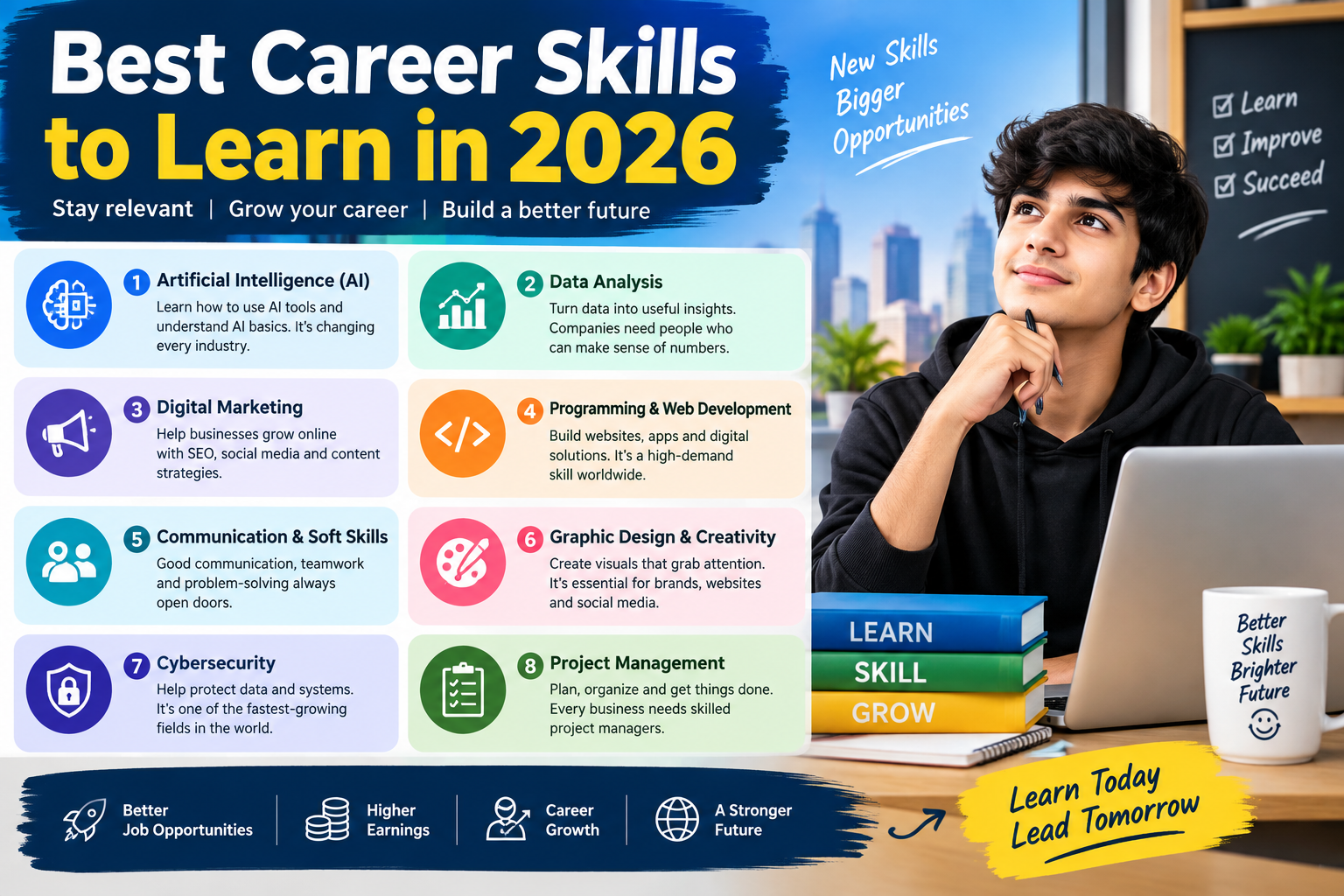
    The job market is changing Career quickly in 2026. Technology, artificial intelligence, remote work, and digital businesses are creating new opportunities while changing the skills employers and clients look for.

    Whether you are a student, freelancer, job seeker, or working professional, learning the right skills can help you become more competitive and open new career opportunities.

    In this guide, we will explore some of the most useful career skills to learn in 2026.

    1. Artificial Intelligence Career

    AI is becoming an important part of many industries. You do not necessarily need to become an AI engineer to benefit from it.

    Learning how to use AI tools effectively can help you with:

    • Research
    • Writing and editing
    • Data analysis
    • Content creation
    • Automation
    • Productivity
    • Customer support

    AI literacy is becoming useful across many different careers.

    2. Digital Marketing Career

    Businesses need people who can help them reach customers online.

    Important digital marketing skills include:

    • Search engine optimization (SEO)
    • Social media marketing
    • Email marketing
    • Content marketing
    • Paid advertising
    • Analytics

    Digital marketing can also be a useful skill for freelancers because businesses often hire independent professionals for specific marketing tasks.learn more

    3. Web Development Career

    Web development remains an important digital career skill.

    Beginners can start with:

    • HTML
    • CSS
    • JavaScript
    • WordPress
    • Basic website design

    As you improve, you can learn frameworks, databases, APIs, and other development technologies.

    Web development can lead to freelance projects, employment, or your own online business.

    4. Communication Skills

    Technical skills are important, but communication is useful in almost every career.

    Strong communication can help you:

    • Explain ideas clearly
    • Write professional messages
    • Work with teams
    • Talk with clients
    • Give presentations
    • Handle workplace problems

    Improving your writing and speaking skills can make your other professional skills more valuable.

    5. Data Analysis

    Organizations collect large amounts of information and need people who can understand it.

    Beginners can start by learning:

    • Microsoft Excel or Google Sheets
    • Basic statistics
    • Data visualization
    • SQL
    • Business analytics

    You can gradually move toward more advanced tools and programming languages as your knowledge improves.

    6. Graphic Design Career

    Visual content is important for websites, social media, advertisements, presentations, and businesses.

    Useful design skills include:

    • Basic design principles
    • Typography
    • Branding
    • Social media graphics
    • Presentation design
    • UI design

    Tools such as Canva and professional design software can help beginners practice and build a portfolio.

    7. Video Editing

    Video continues to be an important form of online content.

    Video editing skills can be useful for:

    • YouTube videos
    • Short-form videos
    • Social media content
    • Advertisements
    • Online courses
    • Business presentations

    Start with basic cutting, transitions, captions, audio, and visual effects before moving into advanced editing.

    8. Project Management

    Project management skills are useful for people who organize tasks, teams, deadlines, and resources.

    Important skills include:

    • Planning
    • Time management
    • Organization
    • Task management
    • Team communication
    • Problem solving

    These skills can be useful in technology, marketing, business, freelancing, and many other fields.

    9. Cybersecurity Awareness

    As businesses and individuals become more dependent on technology, understanding basic cybersecurity is increasingly valuable.

    You can begin by learning about:

    • Strong passwords
    • Mu
  • How to Start Freelancing With No Experience

    How to Start Freelancing With No Experience

    How to start Freelancing With No Experience starting freelancing with no professional experience can feel difficult, but you do not need years of experience to get your first client. You need a useful skill, a good portfolio, a professional profile, and consistency.

    Whether you are a student, beginner, or someone looking for a new career, freelancing can be a practical way to build experience and earn money online.

    What Is Freelancing?

    Freelancing means working independently for clients instead of being a permanent employee of one company. Freelancers can work on short-term projects, long-term contracts, or individual click here

    Common Freelancing services include:

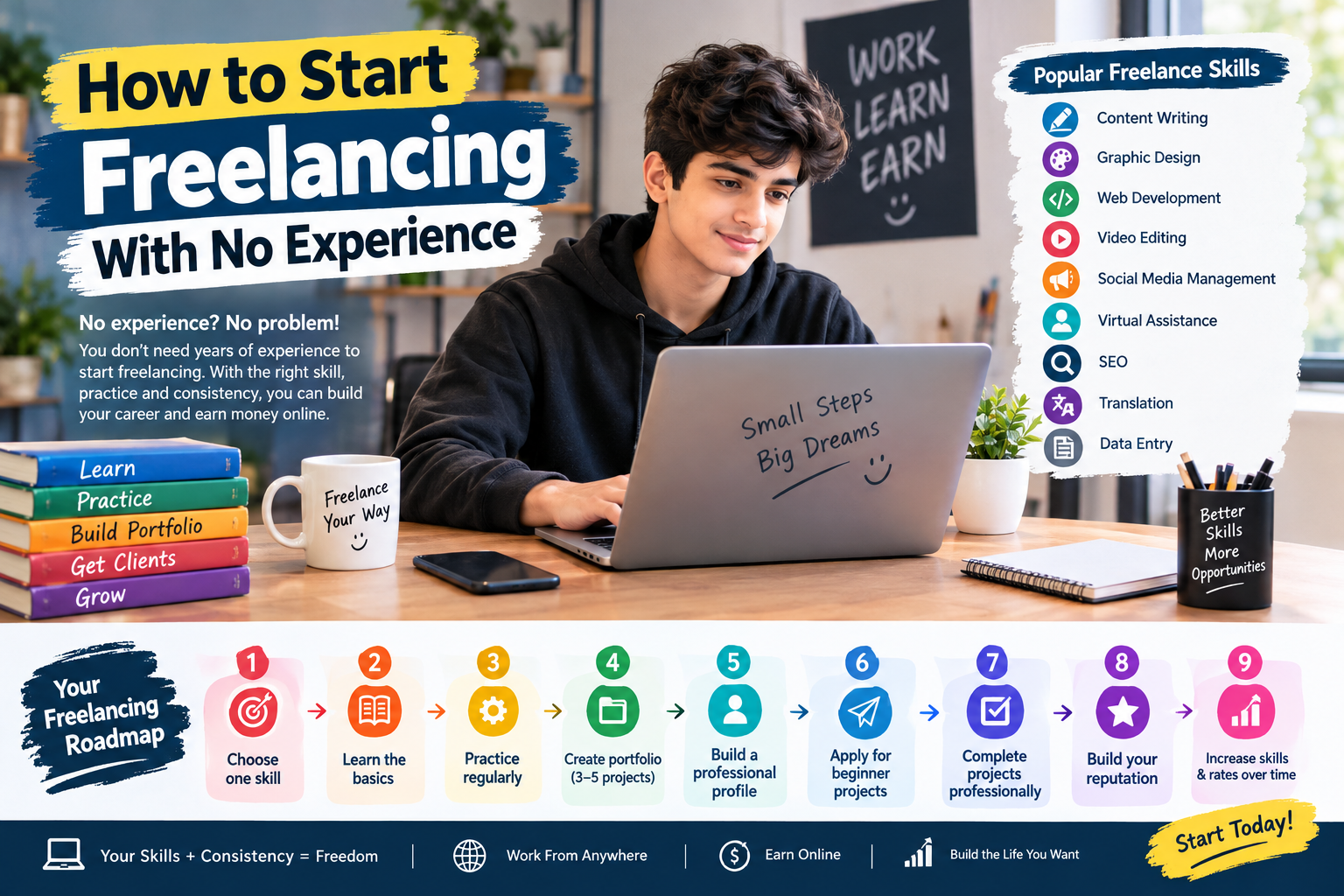
    • Content writing
    • Graphic design
    • Web development
    • Video editing
    • Social media management
    • Virtual assistance
    • SEO
    • Translation
    • Data entry

    1. Choose One Skill for Freelancing

    The first step is to choose one skill that you can learn and offer to clients.

    Do not try to learn everything at once. Pick one area and focus on improving it.

    For example, if you enjoy writing, start with content writing. If you like technology, consider web development. If you enjoy visual work, graphic design or video editing may be suitable options.

    2. Learn the Basics for Freelancing

    You do not necessarily need an expensive course to start learning.

    Use free online tutorials, documentation, practice exercises, and educational videos. Spend time learning the fundamentals before trying to sell your service.

    Create a simple learning schedule and practice regularly.

    3. Build a Portfolio Without Clients

    One of the biggest problems beginners face is having no previous work to show.

    You can solve this by creating sample projects.

    For example:

    Content Writer: Write three sample blog posts.

    Graphic Designer: Create sample logos, social media posts, or banners.

    Web Developer: Build a simple personal website or demo website.

    Video Editor: Create a few short sample edits.

    Your portfolio demonstrates what you can do, even if you have not worked with a real client yet.

    4. Create a Professional Profile for Freelancing

    Once you have a skill and portfolio, create a professional profile on suitable freelance platforms and professional networks.

    Your profile should clearly explain:

    • What service you provide
    • Who you can help
    • What skills you have
    • What type of projects you accept
    • Examples of your work

    Use a clear profile photo and write a simple, professional description.

    5. Start With Small Projects

    As a beginner, focus on getting your first few projects rather than trying to handle large projects immediately.

    Small projects can help you:

    • Build experience
    • Improve communication
    • Collect reviews or testimonials
    • Understand client expectations
    • Strengthen your portfolio

    After gaining experience, you can gradually take on more complex work.

    6. Write Better Proposals

    When applying for a project, avoid sending the exact same message to every client.

    Read the project description carefully and explain how you can help.

    A good proposal should be:

    • Short and clear
    • Relevant to the project
    • Professional
    • Focused on the client’s needs
    • Supported by examples of your work

    Instead of simply saying, “I can do this job,” explain what you will do and why your skills are relevant.

    7. Communicate Professionally

    Good communication is an important part of freelancing.

    Respond politely, ask for clarification when necessary, meet agreed deadlines, and keep the client updated about the project.

    You can be highly skilled, but poor communication can still create problems with clients.

    8. Avoid Common Beginner Mistakes

    New freelancers often make mistakes such as:

    • Offering too many unrelated services
    • Copying other freelancers’ profiles
    • Creating fake experience
    • Accepting projects they cannot complete
    • Missing deadlines
    • Sending generic proposals
    • Expecting immediate success

    Focus on building real skills and delivering quality work.

    9. Keep Improving Your Skills

    Freelancing is competitive, so learning should continue after you get your first client.

    Follow changes in your industry and learn new tools that can improve your work.

    For example, a content writer can learn SEO, while a web developer can learn modern development tools.

    10. Be Patient and Consistent

    Getting your first freelance client may take time. Do not assume that you have failed simply because you do not get a project immediately.

    Use the early stage to improve your portfolio, proposals, communication, and skills.

    Consistency can help you gradually build experience and confidence.

    A Simple Freelance Roadmap

    Step 1: Choose one skill
    ↓
    Step 2: Learn the fundamentals
    ↓
    Step 3: Practice regularly
    ↓
    Step 4: Create 3–5 portfolio projects
    ↓
    Step 5: Build a professional profile
    ↓
    Step 6: Apply for suitable beginner projects
    ↓
    Step 7: Complete projects professionally
    ↓
    Step 8: Build your reputation
    ↓
    Step 9: Increase your skills and rates over time

    Final Thoughts

    Starting freelancing with no experience is possible if you approach it as a skill-building process. Choose one skill, practice it, create a portfolio, build a professional profile, and consistently look for suitable opportunities.

    Your first goal should not simply be to make money. Focus on developing valuable skills and building real experience. As your skills and portfolio grow, you can pursue more opportunities and develop freelancing into a long-term career.